FAIRLinked Command-Line Interface (CLI)
This document provides instructions for using the FAIRLinked command-line tool. The tool is organized into three main sub-modules: InterfaceMDS, RDFTableConversion, and QBWorkflow.
General Usage
The tool is invoked from the command line using the main script name, followed by a command and its specific arguments.
FAIRLinked [COMMAND] [OPTIONS]
To see the help message for any command, use the -h or --help flag.
FAIRLinked filter -h
FAIRLinked generate-template --help
InterfaceMDS Commands
These commands are used for interacting with the Materials Data Schema (MDS) ontology.
filter
Get terms associated with a certain Domain, Subdomain, or Study Stage.
Description:
Term search using Domain, SubDomain, or Study Stage. For a complete list of Domains and SubDomains, run FAIRLinked view-domains and FAIRLinked dir-make.
Current Study Stages include: Synthesis, Formulation, Materials Processing, Sample, Tool, Recipe, Result, Analysis, Modelling.
Usage:
FAIRLinked filter -t <SEARCH_TYPES> -q <QUERY_TERM> [OPTIONS]
Arguments:
-t, --search_types: (Required) Specifies search criteria. Choices:"Domain","SubDomain","Study Stage".-q, --query_term: (Required) Enter the domain, subdomain, or study stage.-op, --ontology_path: Path to the ontology file. Defaults to"default".-te, --ttl_extr: Specifies whether to save search results. Choices:"T"or"F". Defaults to"F".-tp, --ttl_path: If saving results, provide the full path and filename for the output.
Example:
FAIRLinked filter -t "SubDomain" -q "Chem-rxn"
view-domains
Display unique Domains and SubDomains from the ontology.
FAIRLinked view-domains
dir-make
View and make a directory tree of turtle files based on domains and subdomains.
FAIRLinked dir-make
add-terms
Add new terms to an existing ontology file.
FAIRLinked add-terms -op <PATH_TO_ONTOLOGY>
term-search
Search for terms by matching term labels using a fuzzy search algorithm.
FAIRLinked term-search
RDFTableConversion Commands
These commands facilitate the conversion of tabular data (CSV) to and from RDF (JSON-LD format).
generate-template
Generate a JSON-LD template based on a CSV file.
Description: Generates a template for users to fill in column metadata (units, definitions, notes). For labels matched to MDS-Onto, definitions are pre-filled.
Usage:
FAIRLinked generate-template -cp <CSV_PATH> -out <OUTPUT_PATH> -lp <LOG_PATH> [OPTIONS]
Arguments:
-cp, --csv_path: (Required) Path to the input CSV file.-out, --output_path: (Required) Path to save the output JSON-LD template.-lp, --log_path: (Required) Path to directory for log files.-op, --ontology_path: Path to ontology file.-sp, --skip_prompts: Skip the metadata prompts (flag).
Formatting Guidelines:
Column names should be “common” or alternative names.
Rows 2-4 are reserved for type, units, and study stage.
Data begins on the 5th row.
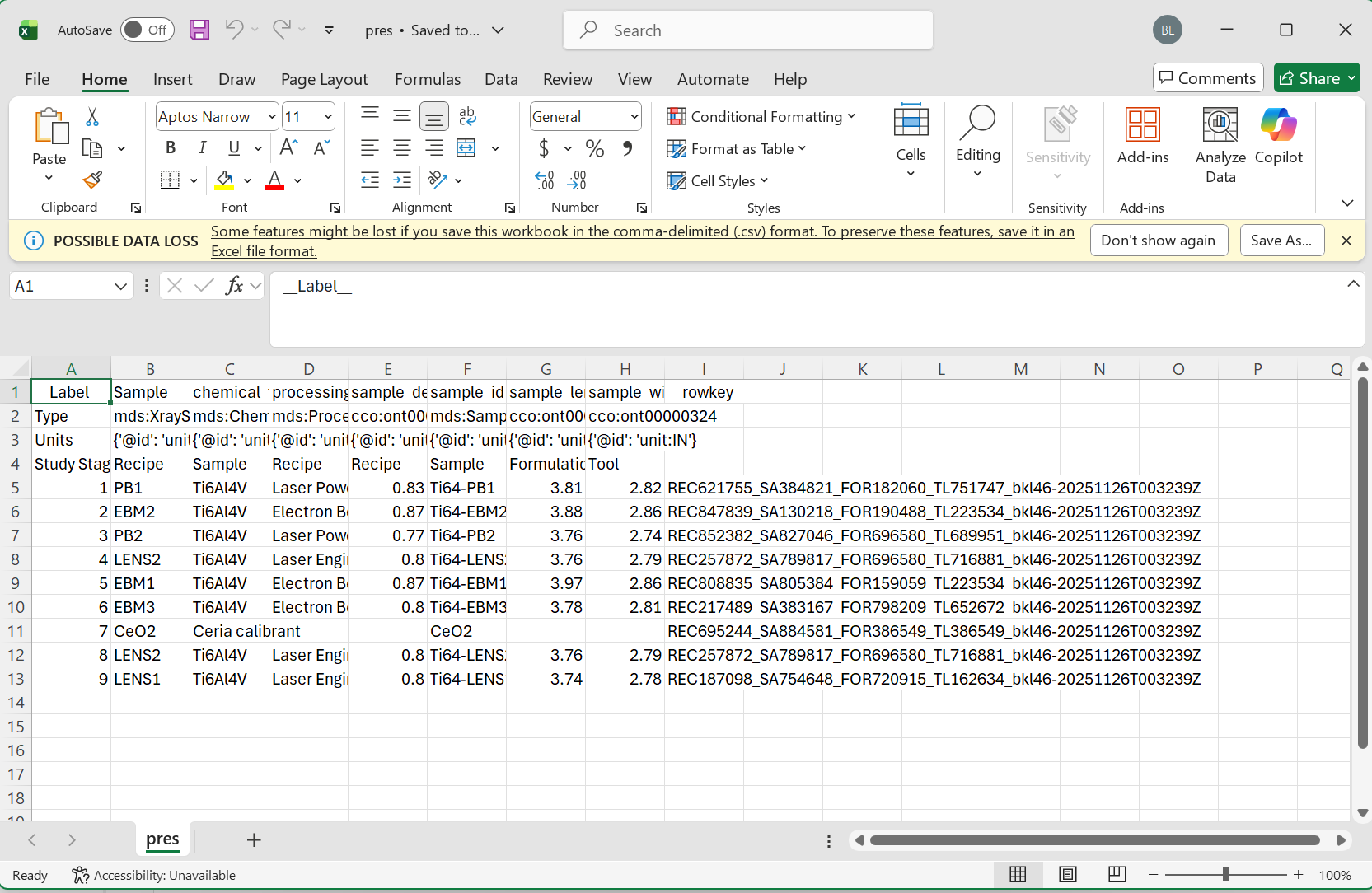
Full Table reference guide.
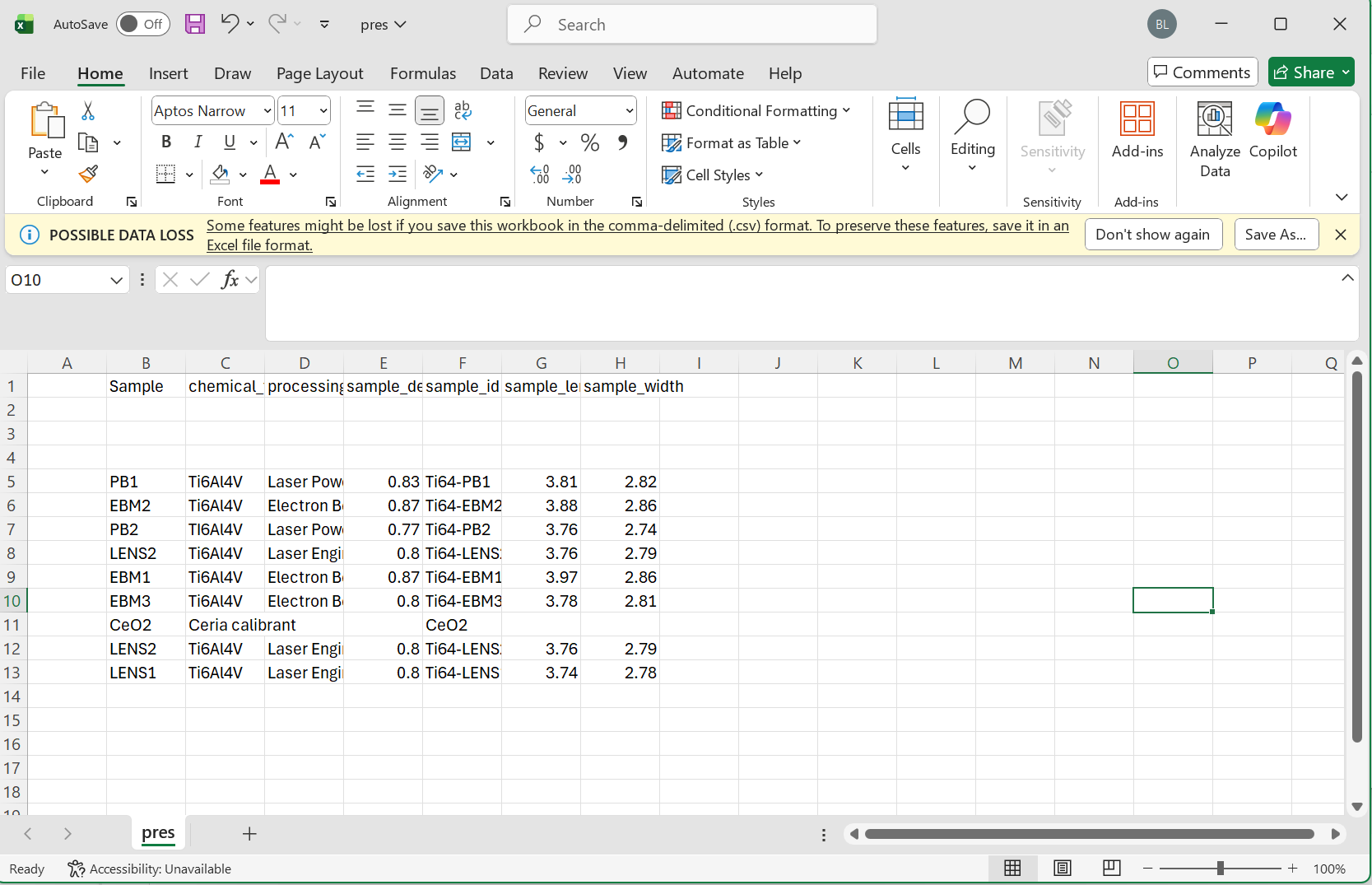
Minimum Viable Data (Sparse Table).
serialize-data
Create a directory of JSON-LD files from a single CSV file and a metadata template.
Usage:
FAIRLinked serialize-data -mdt <TEMPLATE_PATH> -cf <CSV_PATH> -rkc <ROW_KEY_COLS> -orc <ORCID> -of <OUTPUT_FOLDER> [OPTIONS]
Arguments:
-mdt, --metadata_template: (Required) Path to completed JSON-LD template.-cf, --csv_file: (Required) Path to the CSV data.-orc, --orcid: (Required) ORCID identifier (e.g.,"0000-0001-2345-6789").-of, --output_folder: (Required) Output directory.-rkc, --row_key_cols: (Optional) Columns that uniquely identify rows.
Example:
FAIRLinked serialize-data \
    -mdt "/metadata/template.json" \
    -cf "/data/experiments.csv" \
    -rkc "SampleID,RunNumber" \
    -orc "0000-0001-2345-6789" \
    -of "/output/jsonld_files/"
deserialize-data
Deserialize a directory of JSON-LD files back into a CSV file.
Usage:
FAIRLinked deserialize-data -jd <JSONLD_DIRECTORY> -on <OUTPUT_NAME> -od <OUTPUT_DIR>
Example:
FAIRLinked deserialize-data \
    -jd "/output/jsonld_files/" \
    -on "reconstructed_data" \
    -od "/data/reconstructed/"
QBWorkflow Commands
data-cube-run
Start the RDF Data Cube Workflow.
Description: A comprehensive FAIRification workflow for multidimensional datasets adhering to linked data best practices.
Usage:
FAIRLinked data-cube-run