User Guide
Subpackages
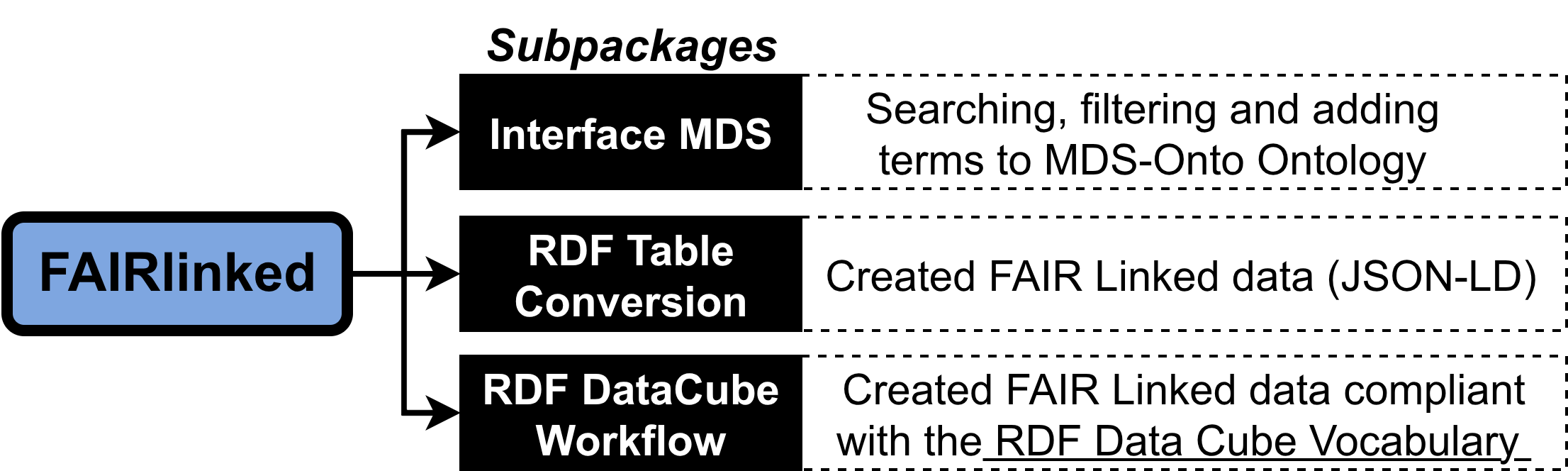
The package is organized into three subpackages, each addressing different levels of semantic web expertise and data modeling requirements:
1. InterfaceMDS: A library of functions that enables direct interaction with MDS-Onto, allowing users to query, extend, and integrate ontology-driven metadata into their datasets and analytical pipelines.
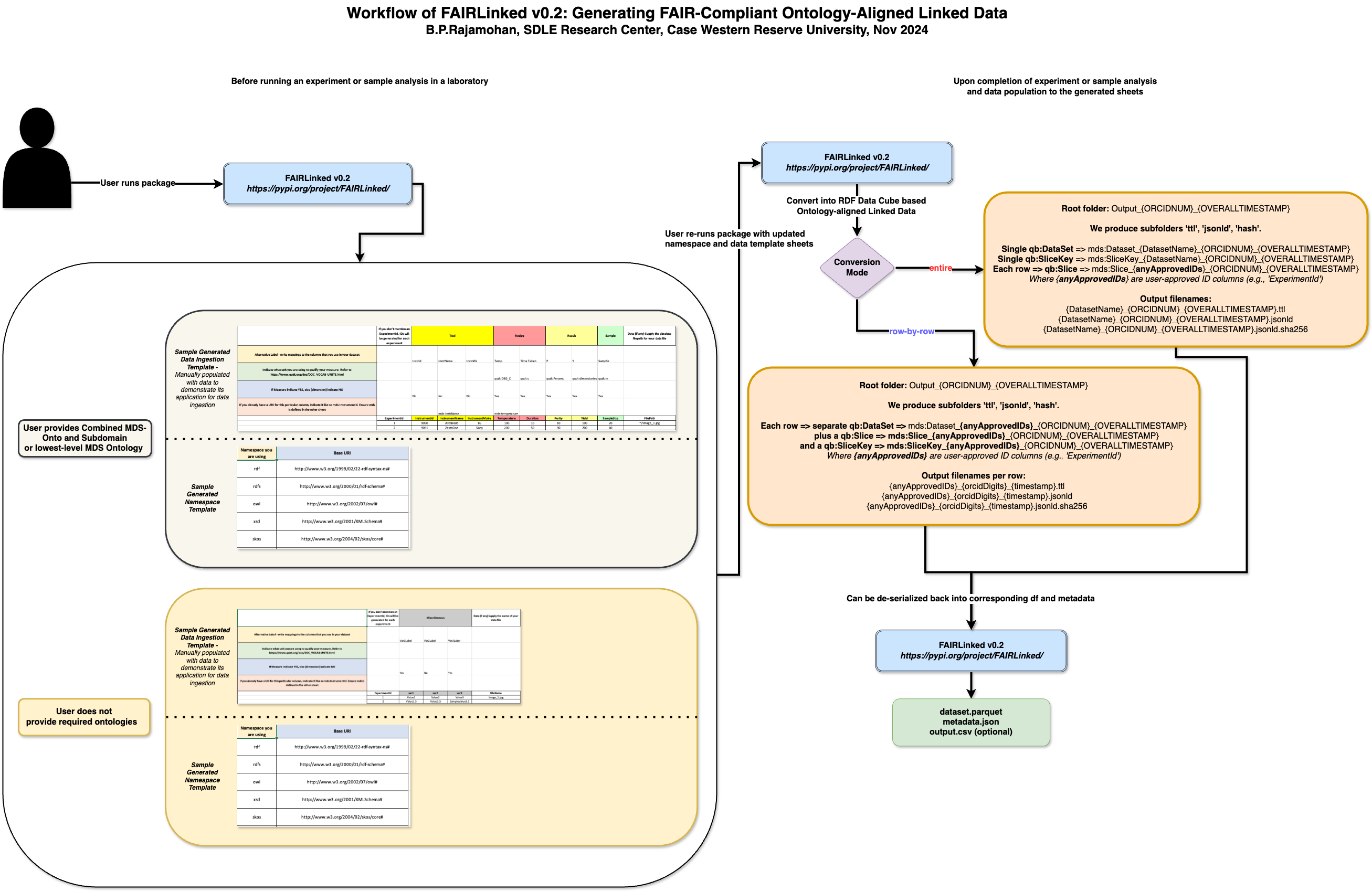
2. QBWorkflow: A comprehensive FAIRification workflow designed for users familiar with the RDF Data Cube vocabulary. This workflow supports the creation of richly structured, multidimensional datasets that adhere to linked data best practices and can be easily queried, combined, and analyzed.
3. RDFTableConversion: A streamlined FAIRification workflow for users who prefer a lighter approach that does not require RDF Data Cube. Instead, it leverages a JSON-LD template populated with standard JSON objects derived from table columns. This approach enables users to transform tabular datasets into linked data while maintaining control over metadata content and structure.
By offering both advanced and simplified pathways for converting data into semantically rich, machine-readable formats, FAIRLinked lowers the barrier to adopting FAIR principles in the materials science community. Its modular design allows researchers to choose the workflow that best matches their technical expertise, data complexity, and intended use cases, thereby promoting greater data discoverability, interoperability, and reuse.
# InterfaceMDS Subpackage
import FAIRLinked.InterfaceMDS
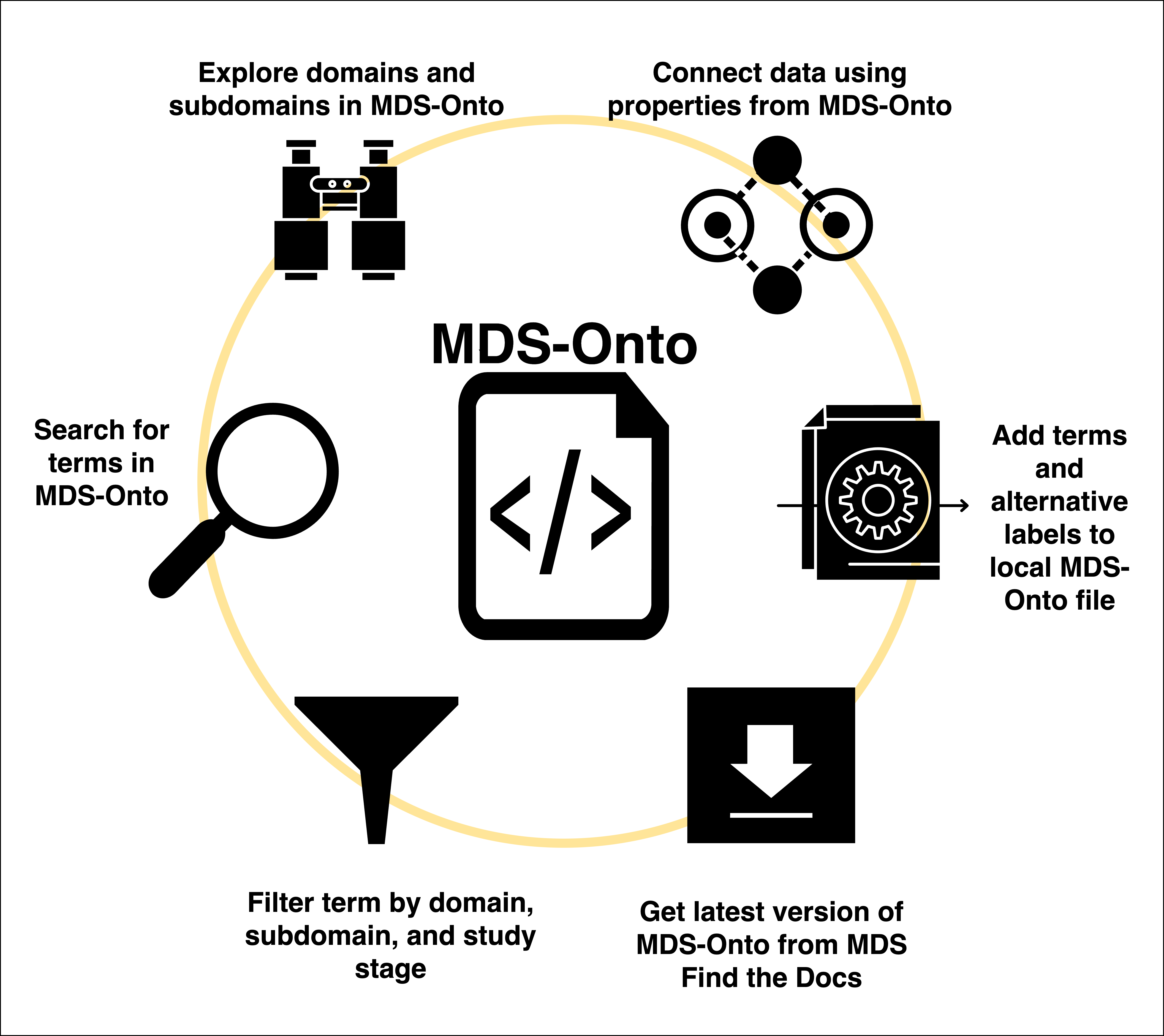
Functions in Interface MDS allow users to interact with MDS-Onto and search for terms relevant to their domains. This includes loading MDS-Onto into an RDFLib Graph, view domains and subdomains, term search, and add new ontology terms to a local copy.
## Load latest version of MDS-Onto
import FAIRLinked.InterfaceMDS.load_mds_ontology
from FAIRLinked.InterfaceMDS.load_mds_ontology import load_mds_ontology_graph

mds_graph = load_mds_ontology_graph()
## View domains/subdomains in MDS-Onto
Terms in MDS-Onto are categorized under domains and subdomains, groupings related to topic areas currently being researched at SDLE and collaborators. More information about domains and subdomains can be found at here
import FAIRLinked.InterfaceMDS.domain_subdomain_viewer
from FAIRLinked.InterfaceMDS.domain_subdomain_viewer import domain_subdomain_viewer

domain_subdomain_viewer()
## View domains/subdomains tree in MDS-Onto
import FAIRLinked.InterfaceMDS.domain_subdomain_viewer
from FAIRLinked.InterfaceMDS.domain_subdomain_viewer import domain_subdomain_directory

domain_subdomain_directory()
Generate an actual file directory with sub-ontologies tagged by domain/subdomain:
import FAIRLinked.InterfaceMDS.load_mds_ontology
from FAIRLinked.InterfaceMDS.load_mds_ontology import load_mds_ontology_graph
from FAIRLinked.InterfaceMDS.domain_subdomain_viewer import domain_subdomain_directory

mds_graph = load_mds_ontology_graph()
domain_subdomain_directory(onto_graph=mds_graph, output_dir="path/to/output")
## Search for ontology terms
from FAIRLinked.InterfaceMDS.rdf_subject_extractor import extract_subject_details, fuzzy_filter_subjects_strict
from FAIRLinked.InterfaceMDS.load_mds_ontology import load_mds_ontology_graph

mds_graph = load_mds_ontology_graph()
onto_dataframe = extract_subject_details(mds_graph)
search_results = fuzzy_filter_subjects_strict(df=onto_dataframe, keywords=["Detector"])

print(search_results)
## Find Domain, Subdomain, and Study Stages
from FAIRLinked.InterfaceMDS.term_search_general import term_search_general

term_search_general(query_term="Chem-Rxn", search_types=["SubDomain"])
Save results to Turtle:
term_search_general(query_term="Chem-Rxn", search_types=["SubDomain"],
                    ttl_extr=1, ttl_path="path/to/output.ttl")
## Add a new term to Ontology
from FAIRLinked.InterfaceMDS.add_ontology_term import add_term_to_ontology

add_term_to_ontology("path/to/mds-onto/file.ttl")
# RDF Table Conversion Subpackage
import FAIRLinked.RDFTableConversion
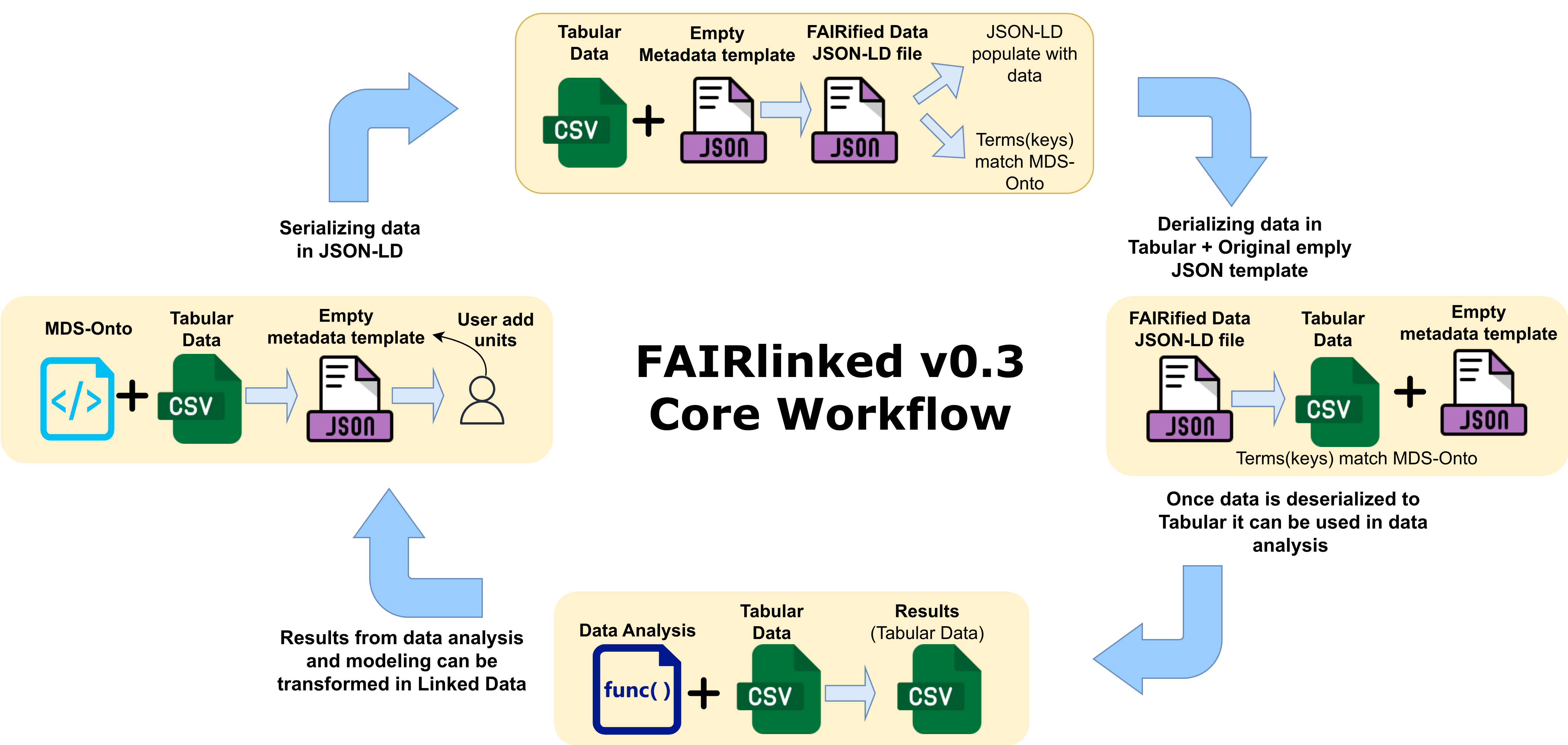
Functions in this subpackage allow you to:
generate a JSON-LD metadata template from a CSV with MDS-compliant terms,
generate JSON-LDs filled with data and MDS semantic relationships,
convert a directory of JSON-LDs back into tabular format.
## Generate a JSON-LD template from CSV
from rdflib import Graph
from FAIRLinked.RDFTableConversion.csv_to_jsonld_mapper import jsonld_template_generator

mds_graph = Graph()
mds_graph.parse("path/to/ontology/file")

jsonld_template_generator(csv_path="path/to/data.csv",
                           ontology_graph=mds_graph,
                           output_path="path/to/output/template.jsonld",
                           matched_log_path="path/to/output/matched.log",
                           unmatched_log_path="path/to/output/unmatched.log")
## Create JSON-LDs from CSVs
import json
from FAIRLinked.RDFTableConversion.csv_to_jsonld_template_filler import extract_data_from_csv

with open("path/to/metadata/template.jsonld", "r") as f:
    metadata_template = json.load(f)

extract_data_from_csv(metadata_template=metadata_template,
                      csv_file="path/to/data.csv",
                      row_key_cols=["sample_id"],
                      id_cols=["sample_id", "measurement_id"],
                      orcid="0000-0000-0000-0000",
                      output_folder="path/to/output/json-lds")
Note
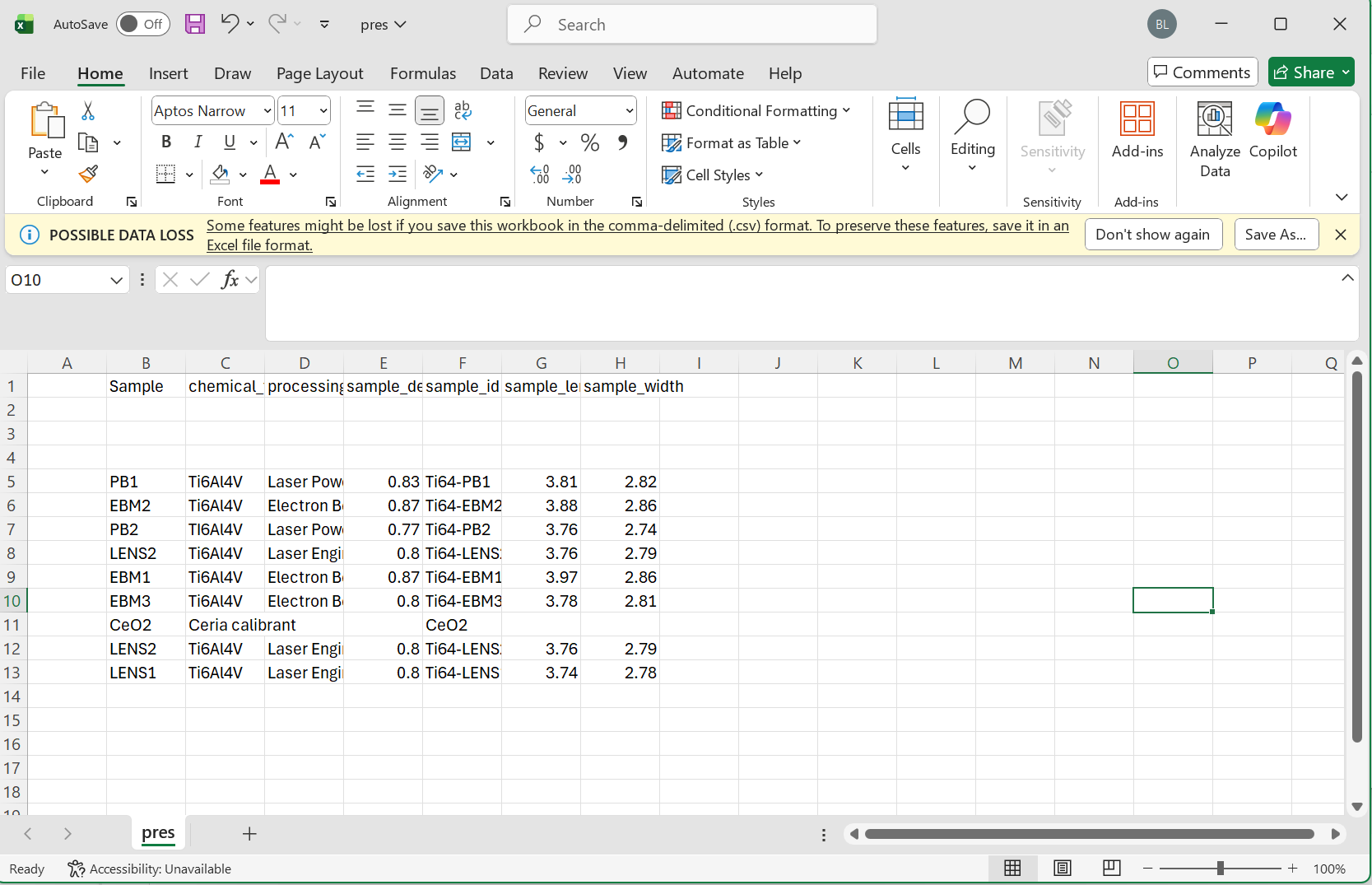
Please make sure to follow the proper formatting guidelines for the input CSV file.
Each column name should be the “common” or alternative name for this object
The following three rows should be reserved for the type, units, and study stage in that order
If values for these are not available, the space should be left blank
Data for each sample can then begin on the 5th row
Please see the following images for reference:
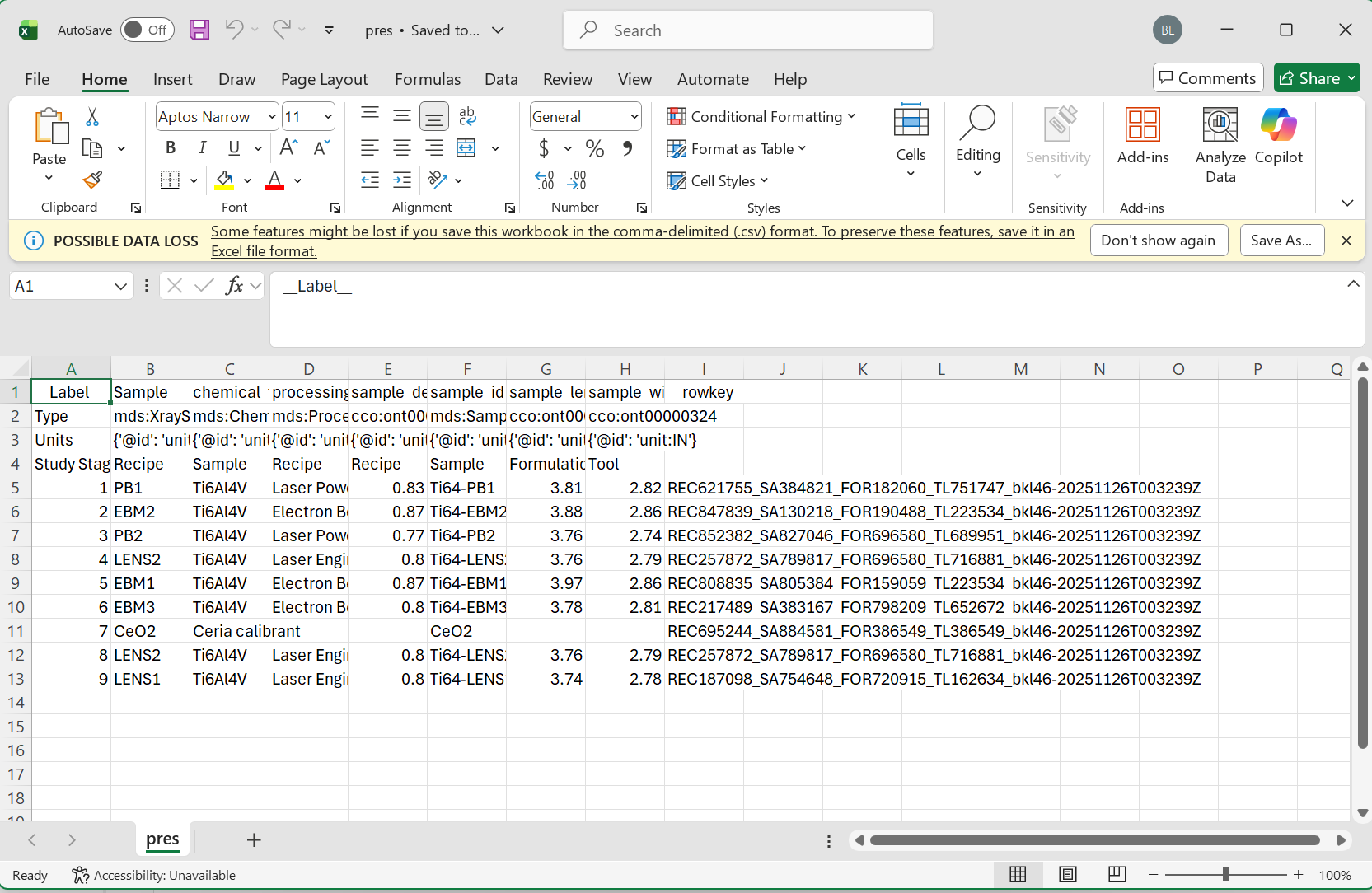
Minimum Viable Data:
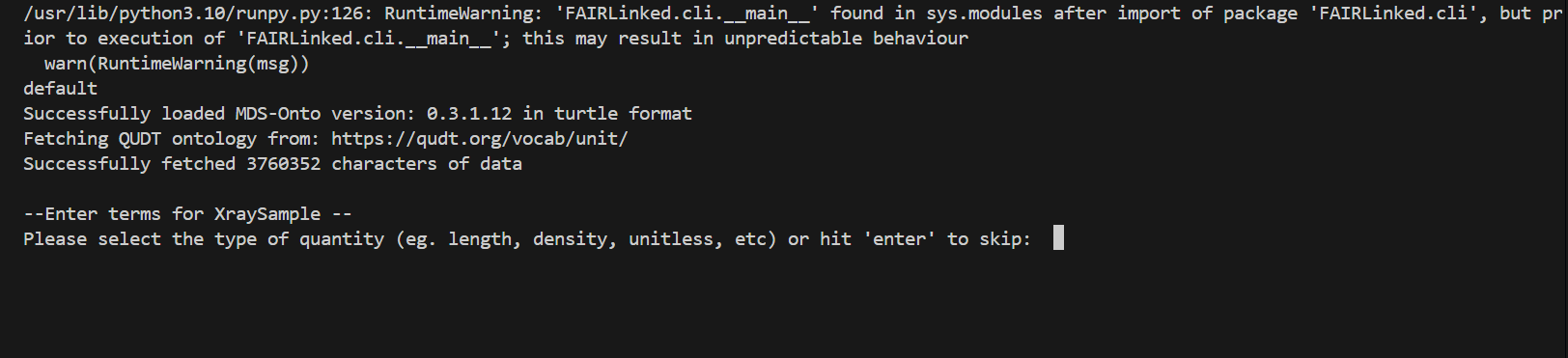
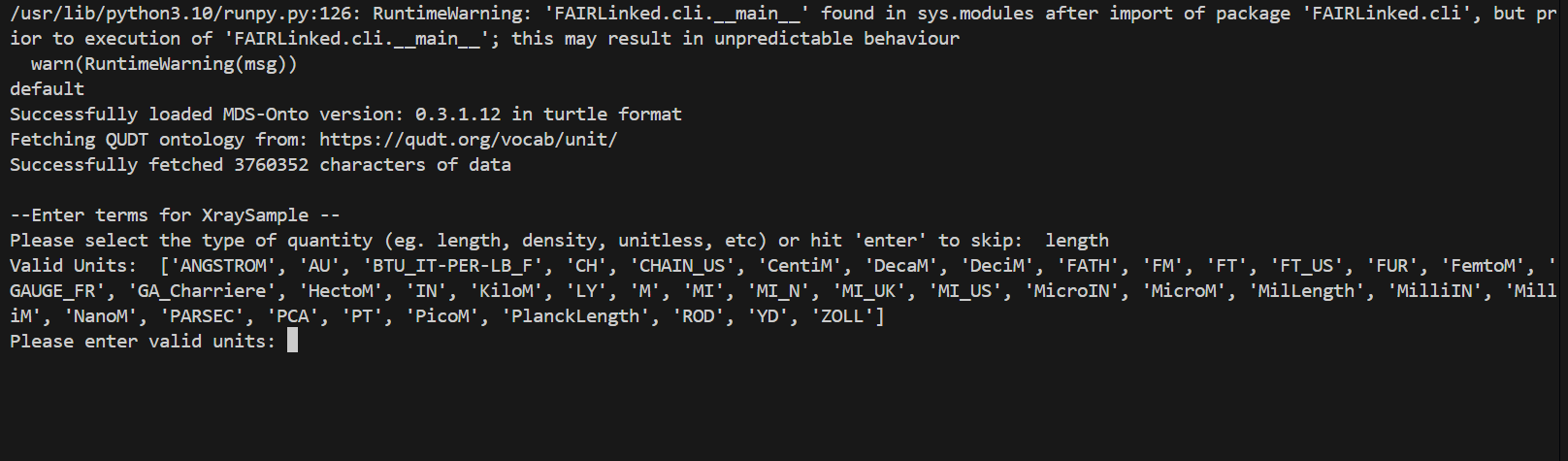
During the template generating process, the user may be prompted for data for different columns. When no units are detected, the user will be prompted for the type of unit, and then given a list of valid units to choose from.
When no study stage is detected, the user will similarly be given a list of study stages to choose from.

## Create JSON-LDs with relationships
In the example below, “relationship_label” should be the rdfs:label value, the full IRI, or the CURIE associated with the property.
import json
from FAIRLinked.InterfaceMDS.load_mds_ontology import load_mds_ontology_graph
from FAIRLinked.RDFTableConversion.csv_to_jsonld_template_filler import extract_data_from_csv

mds_graph = load_mds_ontology_graph()

with open("path/to/metadata/template.jsonld", "r") as f:
    metadata_template = json.load(f)

prop_col_pair_dict = {
    "relationship_label": [("column_1", "column_2")]
}

extract_data_from_csv(metadata_template=metadata_template,
                      csv_file="path/to/data.csv",
                      row_key_cols=["column_1", "column_3"],
                      id_cols=["column_1", "column_2"],
                      orcid="0000-0000-0000-0000",
                      output_folder="path/to/output/json-lds",
                      prop_column_pair_dict=prop_col_pair_dict,
                      ontology_graph=mds_graph)
## Convert JSON-LD directory back to CSV
from FAIRLinked.RDFTableConversion.jsonld_batch_converter import jsonld_directory_to_csv

jsonld_directory_to_csv(input_dir="path/to/json-lds",
                        output_basename="dataset",
                        output_dir="path/to/output")
# RDF DataCube Workflow
from FAIRLinked.QBWorkflow.rdf_data_cube_workflow import rdf_data_cube_workflow_start

rdf_data_cube_workflow_start()
The RDF DataCube workflow turns tabular data into a format compliant with the RDF Data Cube vocabulary.